You must have the appropriate roles to use Shape. These roles are set up in the User Management module.
The following groups contain the roles for use in the Shape module:
 EBS shape Registers
The roles for the Registers module are located in the EBS shape Registers group.
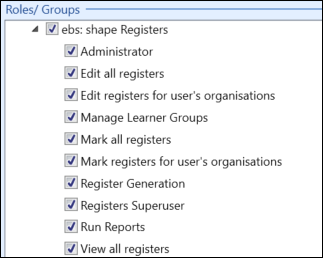
The roles available in the EBS shape Registers group are described in the following table:
| Menu | Allows users to... |
|---|---|
| Administrator | Full access to the Registers module functionality in Shape (that is: users with the Administrator role can undertake all tasks in the Registers module). |
| Edit all registers | Edit all registers in the Registers module in Shape. |
| Edit registers for user's organisations | Edit registers associated only with their department in the Registers module in Shape. |
| Manage Learner Groups | Manage groups (that is: assigning/moving learners) in the Registers module in Shape. |
| Mark all registers | Mark all registers irrespective of organisation in the Registers module in Shape. |
| Mark registers for user's organisations | Mark all registers associated with their organisation/department in the Registers module in Shape. |
| Registers Superuser | Move registers that have been marked in Shape. |
| Run Reports | Run reports for the Registers module, if:
|
| View all registers | View all registers in the Registers module in Shape (read only). |
EBS shape Timetables
The roles for the Timetables module are located in the EBS shape Timetables group.
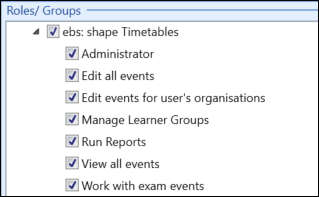
The roles available in the EBS shape Timetables group are described in the following table.
| Menu | Allows users to... |
|---|---|
| Administrator | Full access to the Timetables module functionality in Shape (that is: users with the Administrator role can undertake all tasks in the Timetables module). |
| Edit all events | Edit all timetable events in the Timetables module in Shape. |
| Edit events for user's organisations | Edit timetable events only belonging to their organisation units in the Timetables module in Shape. |
| Manage Learner Groups | Manage groups of learners (that is: assigning/moving learners) in the Timetables module in Shape. |
| Run Reports | Run reports for the Timetables module, if:
|
| View all events |
View all timetable events in the Timetables module in Shape (read only). Important.The Edit All Events role overrides the View All Events role.
|
| Work with exam events | Edit exam events through timetables in the Timetables module in Shape (that is: events created via the Exams system). |